A focused Carrd alternative for independent professionals
A Carrd alternative when your goal is a professional personal website
Carrd gives you a flexible one-page canvas. Storypage starts with your professional source material and turns it into a structured, editable site you can review in private before publishing.
Updated August 14, 2026
Start with your LinkedIn PDF. Nothing becomes public until you choose Publish.
FROM SOURCE MATERIAL TO SITE
Bring the facts
LinkedIn PDF, links, context, and optional material
Review the story
Edit sections, claims, design, color, and photo in private
Publish when ready
Open one polished URL on your own terms
The short answer
Choose based on the work you do not want to do.
Choose Storypage
when the hard part is writing and organizing a credible professional story from material you already have. It gives that story a purpose-built structure, lets you edit the result, and keeps the draft private until you are comfortable sharing it.
Choose Carrd
when the hard part is arranging a flexible one-page experience and you want detailed control over elements, forms, embeds, backgrounds, or custom composition. You bring the message and decide how every part fits together.
Storypage vs Carrd
The difference is not one feature. It is the starting point.
Carrd describes itself as a builder for simple, responsive one-page sites. Storypage is narrower: it is designed to turn professional source material into a personal website. That changes what you need to prepare, which decisions the product makes for you, and what the finished page is meant to communicate.
Starting point
STORYPAGE
Your LinkedIn PDF, plus any links, context, or source material you want the draft to consider.
CARRD
A template or blank canvas that you populate and arrange yourself.
First draft
STORYPAGE
AI turns your source material into editable professional sections and a coherent page narrative.
CARRD
You write the copy, choose the elements, and decide how the one-page layout fits together.
Professional structure
STORYPAGE
Built around positioning, About, services, selected work, writing, recommendations, experience, education, skills, and contact details.
CARRD
Flexible sections and containers can support many kinds of one-page site, including profiles and landing pages.
Design control
STORYPAGE
Choose from eight designs, then edit sections, colors, imagery, and visible content.
CARRD
More granular control over page composition, element placement, backgrounds, embeds, and custom styling.
Before launch
STORYPAGE
The generated site stays private while you review and edit it. You explicitly choose when to publish.
CARRD
You build in the editor and publish the site when its layout and content are ready.
Forms and embeds
STORYPAGE
A professional profile and contact path are the core job. It is not a general-purpose landing-page toolkit.
CARRD
Pro features include forms, embeds, widgets, and other building blocks for broader landing-page jobs.
Best fit
STORYPAGE
A consultant, independent professional, or job seeker who wants existing career material turned into a focused personal site.
CARRD
Someone who wants to compose a flexible one-page site and is comfortable making the copy and layout decisions.
Carrd facts in this comparison were checked against its official product page and documentation for sections, forms, and custom domains on August 3, 2026. Product capabilities can change.
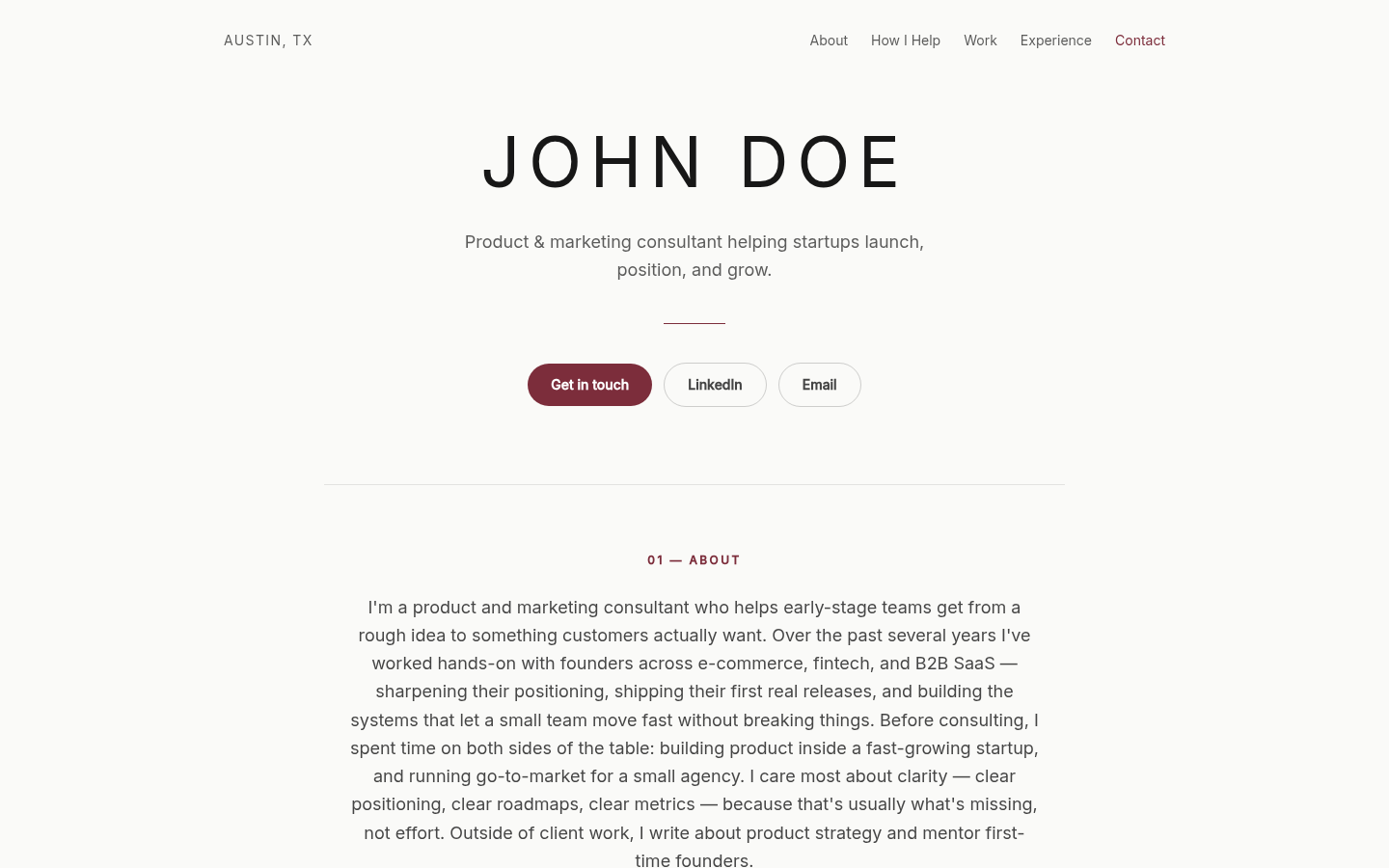
When Storypage is the better fit
You have the experience. You do not want to start with an empty page.
A professional site needs more than a name, headshot, and contact button. It needs a point of view about what to include, what to leave out, and how the pieces form a useful introduction. Storypage is built for that editorial problem.
Your experience is scattered across familiar places
Your LinkedIn profile has roles and dates. Your documents have project context. Your links contain writing or selected work. Storypage gives those materials one professional structure instead of asking you to reconstruct everything inside a blank builder.
You want help with the first narrative
The generated copy is a draft, not a fact you must accept. Its value is giving you something coherent to review. You can tighten positioning, remove weak claims, change sections, and make the page sound like you before anyone else sees it.
You want a deliberate publishing boundary
The site is private while you review it. Saving an edit does not make the draft public. You choose when the public version opens, and you can take it offline again.
When Carrd is the better fit
Keep Carrd on the list when flexibility is the point.
A focused product is not automatically the right product. Carrd covers jobs Storypage is not trying to cover.
If the page is mainly a quick route from a social bio to changing destinations, the Linktree alternative guide is the more relevant comparison.
CUSTOM COMPOSITION
You want to arrange every element
Carrd starts closer to a visual canvas. That is useful when the page needs an unusual hierarchy, layered visuals, special backgrounds, or a layout that does not resemble a professional profile.
LANDING-PAGE TOOLS
You need forms, embeds, or widgets
Carrd's broader toolkit is a better match for an event signup, lead-capture page, lightweight product launch, or link hub with embedded tools.
MULTIPLE JOBS
You are building more than a professional profile
If you want separate one-page sites for campaigns, side projects, events, or experiments, Carrd's general-purpose model gives you more room.
CURRENT SITE
Your Carrd page already does its job
Do not migrate for novelty. If the page is accurate, easy to update, and gives the right reader the right next step, changing builders may create work without improving the result.
A practical decision checklist
Ask what should be easier after you choose.
The best Carrd alternative is not the product with the longest feature list. It is the one that removes the work blocking your actual page.
- 01
Name the reader
A prospective client, recruiter, collaborator, newsletter reader, and event attendee need different context. Decide who should understand you after one visit.
- 02
Name the bottleneck
If writing and organizing the story is hard, start with Storypage. If composing a custom one-page experience is hard, Carrd gives you more visual building blocks.
- 03
Name the next action
A consultant page may ask someone to email. A launch page may collect signups. A link hub may route visitors elsewhere. Pick the product built around that action.
What building with Storypage looks like
Bring source material, then edit the page as an editor.
Storypage does not remove your responsibility to check the result. It changes your first task from assembling blocks to reviewing a draft.
- 01
Provide your LinkedIn PDF
The PDF is required because it gives the first draft a factual career spine. You can also provide optional context and material that helps the page represent the work you want to emphasize.
- 02
Review every generated section
Check the positioning, About copy, services, selected work, writing, recommendations, experience, education, skills, links, and contact action that appear. Remove what does not help the intended reader.
- 03
Choose the presentation
Compare eight designs, then adjust the color, photo, and visible sections. The format stays opinionated enough to create hierarchy without asking you to position every element from scratch.
- 04
Publish only after the claims are yours
The private state gives you room to correct generated language and check links before sharing. Publish when the page is accurate. You remain responsible for what the public version says.
Plan the professional page
Decide what the site needs to prove.
These guides cover the choices that come after picking a builder.
Compare eight website examples
See how the same professional material changes across Storypage designs.
PROOFPlan a consultant portfolio
Choose work samples that help a buyer understand your judgment.
FORMATCompare a site, LinkedIn, and PDF bio
Pick the format that gives a proposal recipient the missing context.
SHARINGChoose when to share the link
Use the site when it answers a question the proposal does not.
Carrd alternative FAQ
Questions worth answering before you switch
What is the best Carrd alternative for a professional personal website?
Storypage is a focused option if you want a site generated from a LinkedIn PDF, structured around your professional story, and kept private while you edit it. Carrd is a stronger option if you want detailed layout control, landing-page tools, forms, or embeds. “Best” depends on which of those jobs you are actually trying to finish.
Is Storypage a general-purpose website builder?
No. Storypage is purpose-built for professional personal sites. It can organize positioning, an About section, services, selected work, selected writing, recommendations, experience, education, skills, and contact details. It is not designed to replace a flexible campaign builder, online store, publication platform, or full multi-page company site.
Should I leave Carrd if my current site already works?
Not automatically. Keep a Carrd site that is current, easy to maintain, and clear to the person you want to reach. Consider Storypage when the page has stayed unfinished because you do not know what to write, how to organize your experience, or how to turn scattered source material into a coherent professional introduction.
Can I review a Storypage before it is public?
Yes. A generated Storypage remains private while you review and edit it. You choose when to publish the public version. That boundary matters because AI-generated copy should be checked for accuracy, emphasis, tone, and missing context before it represents you.
Start with the professional story, then decide if the page is ready.
Build a private draft from your LinkedIn PDF. Review the sections, proof, links, and design before choosing to publish.
Build my private site